
OpenClaw Dashboard Built for the Age of AI Agents - ClawManager
If you have spent any time trying to set up an AI agent, you already know the feeling. You follow the docs, you open a terminal, you type a command, and then... it just sits there. Or it throws an error. Or it works, but you have no idea what it is actually doing, which model it is using, or whether your session even saved.
That frustration is exactly why we built ClawManager.
What Is OpenClaw?

Before we explain ClawManager, you need to understand OpenClaw, because ClawManager sits directly on top of it.
OpenClaw is a powerful, open AI agent gateway. Think of it as the engine underneath your AI team. It handles the heavy lifting: routing conversations to the right model, managing sessions, connecting to messaging channels, running scheduled tasks, and orchestrating multiple AI agents working in parallel.
OpenClaw supports the leading AI models out of the box:
Anthropic Claude (Claude Sonnet 4.6, Claude Opus 4.6, Claude Haiku)
Google Gemini
Microsoft Copilot
OpenAI ChatGPT (including GPT-5.2)
More being added regularly
It is genuinely one of the most capable AI agent platforms available. The problem? It is built for the terminal.
The Problem We Kept Running Into
OpenClaw is incredibly powerful, but using it day-to-day felt harder than it should. Here is what kept coming up:
The terminal is not for everyone. A huge number of people who want to work with AI agents are product managers, entrepreneurs, content creators, and small business owners. Not developers. Telling someone to ssh into a config file and edit JSON by hand is a non-starter.
It was hard to see what was available. Even for technical users, keeping track of which models were configured, which agents were active, which channels were connected, and what each agent was doing required jumping between files and terminal windows constantly.
The official UI was not built for this use case. We needed something designed specifically for people who want to get the most out of AI agents, not just manage raw infrastructure.
So we built ClawManager.
What Is ClawManager?

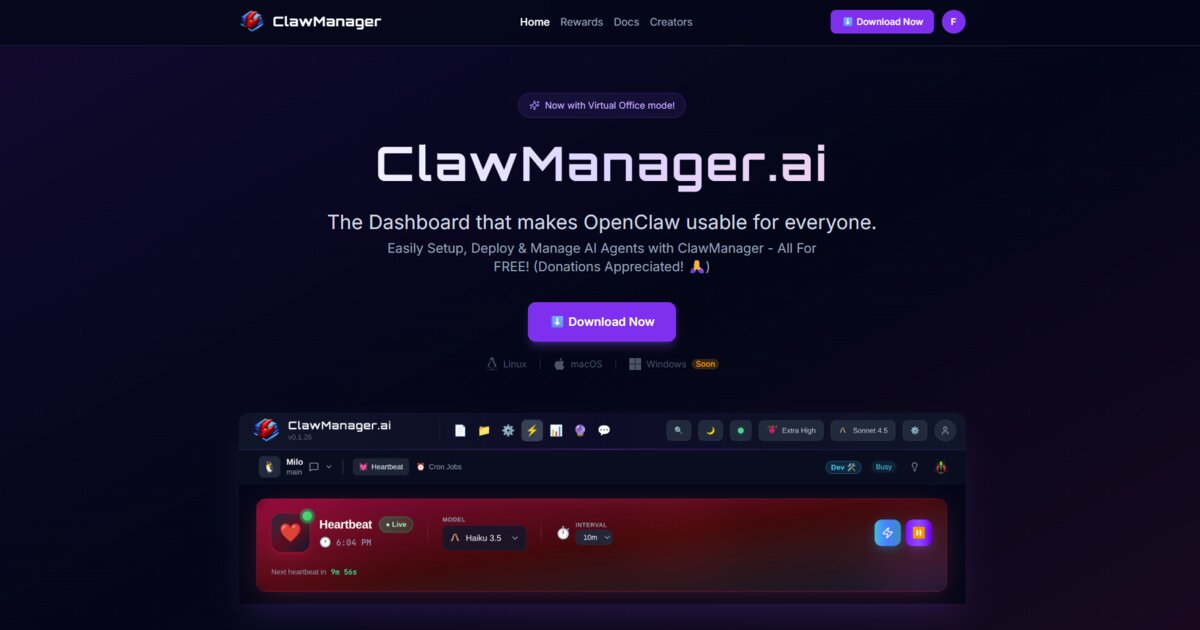
ClawManager is a free desktop application that sits on top of OpenClaw and gives you a full visual OpenClaw dashboard for your AI agents. One interface for everything.
You install it on your machine. It runs locally. No cloud required, no subscription, no data leaving your computer unless you choose to send it somewhere.
Available on:
Windows
macOS
Linux
It is the OpenClaw dashboard that the platform was always missing, built by people who use AI agents every day and got tired of doing everything the hard way.
What You Can Actually Do With It
Manage Your Entire AI Team From One Place
ClawManager gives you a clear view of every agent you have running. Which model they are using, what their current status is, how many sessions they have handled, whether they are online. No more guessing.
You can switch an agent from Claude Sonnet 4.6 to GPT-5.2 in two clicks. Adjust their behaviour, update their system prompt, add tools, all without touching a config file.
Virtual Office for AI Agents

One of our favourite features is the Virtual Office view. Instead of a dry list of agents in a table, you see your AI team laid out like an actual office floor. Each agent has a desk. You can see at a glance who is working, who is idle, and who is in a conversation.
When you are running four or five AI agents simultaneously on different tasks, having that spatial visual overview changes how you think about your team. It makes the concept of an AI Agent Office feel tangible rather than abstract. Your AI team members become real, manageable colleagues rather than invisible background processes.
One-Click Backup and Import
Your agents have custom configurations, system prompts, memory files, and personality settings. All of that lives inside OpenClaw.
ClawManager gives you a one-click backup of your entire agent setup. Export everything to a single file. Restore it on a new machine, share it with a colleague, or keep a snapshot before you make changes.
Moving to a new computer? Your whole AI team travels with you. No rebuilding from scratch.
Model Switching
Not every task needs the most powerful model. ClawManager makes it easy to set up routing rules, switch models mid-project, and see exactly which model each agent is using in real time.
Running a research agent on Claude Opus 4.6 for deep analysis? A support agent on Claude Sonnet 4.6 for speed and cost efficiency? A coding assistant on ChatGPT 5.2? You can manage all of them side by side, see the usage, and adjust on the fly.
Channel Management
Your AI agents can connect to Telegram, Discord, Signal, WhatsApp, and more through OpenClaw. ClawManager gives you a visual interface to configure those connections, see which channels are active, and manage your agents' availability across platforms.
No more editing JSON config files by hand every time you want to add a new channel.
Who Is ClawManager For?
Developers and technical users who want a faster way to manage their OpenClaw setup without living in the terminal.
Small business owners and entrepreneurs who want to deploy virtual assistants and AI agents to handle tasks without needing a dedicated engineer to maintain them.
Creators and researchers who want to run an AI team, experiment with different models and configurations, and actually see what their agents are doing.
Anyone getting started with AI agents who finds the terminal intimidating and wants a proper interface that makes the capabilities of Claude, Gemini, Copilot, ChatGPT, and other models accessible without a learning curve.
ClawManager is not a simplified toy version of AI agent management. It is a full-featured OpenClaw dashboard that exposes everything OpenClaw can do, presented in a way that does not require a computer science degree.
Why Free?
A lot of AI tools start free and quietly become expensive. We want ClawManager to stay accessible.
The economics of running an AI agent team are already demanding. You are paying for API calls to Anthropic, Google, OpenAI. You might be running on your own hardware. You should not also be paying for the dashboard that lets you manage it all.
ClawManager is free. It runs locally. You are in complete control of your data, your models, your agents, and your costs.
Getting Started

If you have OpenClaw installed already, getting ClawManager running takes about two minutes.
Download ClawManager for your platform (Windows, macOS, Linux)
Install and launch the app
Connect it to your local OpenClaw gateway
Your agents appear in the dashboard automatically
New to OpenClaw entirely? ClawManager walks you through the setup. You can have your first AI agent running and connected to a channel in under fifteen minutes.
The Bigger Picture
AI agents are not niche technology anymore. Claude Sonnet 4.6, Claude Opus 4.6, GPT-5.2, Gemini, Copilot, and other modern models are capable of handling real, complex tasks autonomously. The gap between "AI chat app" and "AI team member" has closed significantly.
What has not kept pace is the tooling for people who want to actually use these capabilities without building their own infrastructure. OpenClaw solves the infrastructure problem. ClawManager solves the usability problem.
Together, they give you a genuine Virtual Office for AI Agents. A real AI team, running locally, on your hardware, at your direction.
That is what we are building toward. Come build with us.
Find us:
X / Twitter: x.com/ClawManager
GitHub: github.com/ClawManager/releases
Telegram Channel: t.me/ClawManagerAI
Telegram Chat: t.me/ClawManagerAI_Chat
Download free: clawmanager.ai/download